
Best Office Printer for Small Business
Choosing the right printer for a small office can improve productivity, control printing costs, and make everyday document management easier.
Small businesses in Kolkata often have different printing requirements depending on their industry, team size, document volume, and workflow. A consultancy may mainly need to print invoices and documents, while a school, legal office, healthcare organization, or growing business may require regular scanning, copying, and high-volume printing.
With so many printer and multifunction printer options available, choosing the right equipment can sometimes be confusing.
The best printer for a small office is not necessarily the most expensive or most powerful model. It is the one that matches your printing volume, document requirements, budget, speed, connectivity, and future business needs.
Understanding Your Office Printing Requirements
Before choosing a printer, start by understanding how your office actually uses printing equipment.
Consider:
- How many pages do you print every month?
- Do you mainly print documents or also scan and copy?
- Do you need colour printing?
- Do you regularly print multiple pages at a time?
- Do you require A4 or A3 printing?
- Will multiple employees use the same printer?
- Do you need wireless or network printing?
- How important is printing speed?
- Do you need professional technical support?
Understanding these requirements can help you avoid choosing equipment that is either too basic for your workload or unnecessarily expensive for your business.
“The right office printer should be selected according to your actual workflow, not simply based on features or purchase price.”
Office Printing Solutions Team
Professional Printer & Copier Support
Inkjet vs Laser Printer for a Small Office
One of the first decisions businesses need to make is whether they require an inkjet or laser printer.
Inkjet printers can be suitable for businesses that require occasional colour printing, marketing materials, images, or documents where colour quality is important.
Laser printers are generally designed for faster document printing and can be suitable for offices with regular black-and-white or high-volume printing requirements.
For many professional offices that primarily print text documents, reports, invoices, forms, and business correspondence, a laser-based solution may be worth considering.
The choice should ultimately depend on your expected printing volume and the type of documents your office produces.
Laser Printing Solutions Team
Reliable Printing Equipment for Business
Should a Small Office Choose a Multifunction Printer?
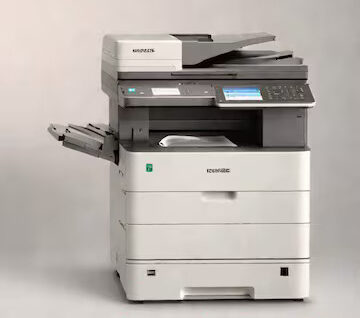
A multifunction printer, commonly known as an MFP, combines multiple functions in a single device.
Depending on the model, an MFP can provide:
- Printing
- Scanning
- Copying
- Document handling
- Network printing
- Colour or monochrome printing
For a small office, combining several functions into one device can help reduce the need for separate equipment.
Instead of purchasing an individual printer, scanner, and copier, businesses can use a suitable multifunction printer for several everyday requirements.
This can be particularly useful when office space is limited or when multiple employees need access to document-related functions.
Multifunction Printer Team
Print, Scan & Copy Solutions for Offices
A4 vs A3 Printer: Which One Does Your Office Need?
Paper size is another important factor.
An A4 printer is generally suitable for everyday office documents such as:
- Letters
- Invoices
- Reports
- Contracts
- Forms
- Internal documents
An A3 printer can be useful when businesses regularly need to produce larger documents such as:
- Posters
- Presentations
- Architectural drawings
- Charts
- Marketing materials
- Large-format business documents
If your office rarely requires A3 printing, an A4 printer may be sufficient.
However, if larger documents are a regular part of your workflow, choosing an A3 multifunction printer may be more practical.
A3 & A4 Printing Equipment Team
Business Printing & Copier Solutions
Consider Your Monthly Printing Volume
Monthly print volume is one of the most important factors when selecting an office printer.
A printer designed for occasional home or low-volume use may not be suitable for an office that prints hundreds or thousands of pages every month.
Before selecting a model, estimate your average monthly printing requirement.
For example:
Low-volume office
Suitable for businesses that print only a limited number of documents each month.
Moderate-volume office
Suitable for offices with regular invoices, reports, contracts, forms, and administrative documents.
High-volume office
Requires equipment designed to handle frequent printing with appropriate speed, paper capacity, durability, and maintenance support.
Selecting equipment based on actual volume can help improve efficiency and avoid unnecessary equipment costs.
Office Printing Equipment Team
Solutions for Different Printing Volumes
Don’t Ignore Printing Speed
Printing speed can have a significant effect on office productivity.
If employees regularly need to wait for large documents to print, a slow printer can create unnecessary delays.
Printing speed becomes particularly important for:
- Busy administrative offices
- Educational institutions
- Healthcare organizations
- Legal offices
- Corporate offices
- Printing-intensive businesses
For smaller offices with limited printing requirements, extremely high printing speeds may not be necessary.
The objective is to choose a printer that provides an appropriate balance between speed, cost, and workload.
Check the Cost of Toner and Consumables
The purchase price of a printer is only one part of the overall cost.
Businesses should also consider:
- Toner or ink costs
- Drum replacement
- Maintenance
- Spare parts
- Paper consumption
- Service requirements
- Electricity consumption
A printer with a lower purchase price may not always be the most economical option over several years if its consumable and maintenance costs are high.
For this reason, businesses should consider the total cost of ownership (TCO) before making a decision.
“A cost-effective office printer is one that remains economical throughout its working life—not simply one with the lowest initial price.”
Printer Cost Management Team
Efficient & Cost-Effective Printing Solutions
Network and Wireless Connectivity
Modern offices often have several employees who need access to the same printer.
Network connectivity can allow multiple computers to use one centralized printing device.
Depending on the equipment, businesses may also benefit from:
- Wi-Fi connectivity
- Ethernet networking
- Mobile printing
- Network scanning
- Shared office printing
Before choosing a printer, consider how employees will connect to and use the equipment.
For a small office, a properly networked multifunction printer can often serve several employees without requiring an individual printer at every workstation.
Security Features for Office Printers
Printers can handle sensitive business information, including contracts, financial documents, employee records, customer information, and confidential reports.
Businesses should therefore consider printer security when selecting office equipment.
Depending on the model, useful security features may include:
- User authentication
- Secure print
- Password-protected access
- Network security
- Document access controls
Security requirements become particularly important for businesses dealing with confidential or regulated information.
Printer Security & Support Team
Secure Office Printing Solutions
Printer Rental Can Be an Option for Small Offices
Buying a printer is not the only option available to businesses.
For small or growing offices, printer rental in Kolkata can provide access to professional printing equipment without requiring a large upfront investment.
Printer rental can be useful for businesses that:
- Want to control initial capital expenditure
- Have changing printing requirements
- Need professional multifunction equipment
- Want access to technical support
- Require equipment for a specific project
- Prefer predictable monthly expenses
Rental can also allow businesses to select equipment based on their current requirements and consider upgrades as their printing needs change.
Printer Rental & Managed Printing Team
Flexible Printing Solutions for Kolkata Businesses
When Should You Buy a Printer?
Purchasing may be appropriate for businesses that have predictable printing requirements and expect to use the same equipment for an extended period.
Buying may suit organizations that:
- Have sufficient capital for equipment investment
- Have stable printing volumes
- Want direct ownership
- Have long-term requirements
- Have resources to manage maintenance
However, businesses should also account for servicing, consumables, repairs, and eventual replacement when calculating the total investment.
What Features Should a Small Office Look For?
The ideal printer depends on the office, but several features are commonly useful.
Automatic Document Feeder
An ADF can make scanning or copying multiple pages easier and faster.
Duplex Printing
Automatic two-sided printing can help reduce paper consumption and improve document efficiency.
Network Printing
Allows multiple employees to access the same printer.
Scanning and Copying
Useful for offices that regularly handle physical documents.
Adequate Paper Capacity
Reduces the need for frequent paper loading during busy periods.
Energy Efficiency
Efficient equipment can help control long-term operating costs.
Technical Support
Reliable technical assistance can reduce downtime when equipment problems occur.
How to Choose the Right Printer for Your Small Office
Before making a final decision, create a simple checklist.
- Estimate monthly print volume
Understand how many pages your office prints.
- Identify document types
Determine whether you mainly print text documents, colour materials, reports, forms, or larger documents.
- Decide whether you need an MFP
If scanning and copying are regular requirements, a multifunction printer may be more practical.
- Choose the appropriate paper size
Decide whether A4 is sufficient or whether your business requires A3 printing.
- Compare running costs
Check toner, ink, maintenance, and other operating expenses.
- Consider connectivity
Make sure the printer can support the way your employees work.
- Check security requirements
Consider whether your business handles confidential documents.
- Think about future requirements
Choose equipment that can support your expected business growth.
- Compare rental and purchase options
Evaluate the upfront investment, monthly expenses, maintenance, and long-term requirements.
Common Mistakes to Avoid When Choosing an Office Printer
Businesses can sometimes make printer decisions based only on the initial purchase price.
Some common mistakes include:
- Choosing equipment with a capacity lower than the office workload
- Ignoring toner and maintenance costs
- Buying features that the office never uses
- Choosing an unsuitable paper size
- Ignoring network requirements
- Not considering technical support
- Selecting equipment without estimating monthly printing volume
- Failing to plan for future business requirements
A little planning before purchasing or renting can help businesses avoid unnecessary expenses and operational problems.
Small Office Printing Equipment Team
Practical Solutions for Everyday Business Needs
Choosing the Right Printer for Kolkata Businesses
For small businesses in Kolkata, the ideal printer depends on the nature of the business and its daily workflow.
A consultancy may require a compact monochrome printer, while a growing office may benefit from a networked multifunction printer with scanning and copying capabilities.
Businesses that regularly produce larger documents may require A3 equipment, while offices handling sensitive documents may need additional security features.
There is no single printer that is perfect for every business.
The objective is to match the equipment with your