

Reduce Office Printing Costs
Office printing is an essential business expense, but without proper planning, printing costs can quickly become higher than expected.
From toner and paper to maintenance, electricity, equipment upgrades, and unnecessary printing, businesses often spend more on printing than they realize.
For Kolkata businesses, including corporate offices, educational institutions, healthcare organizations, legal firms, startups, and professional service providers, managing printing expenses can help improve overall operational efficiency.
Reducing printing costs does not necessarily mean printing less. The goal is to create a more efficient printing system where businesses use the right equipment, consumables, settings, and processes for their actual requirements.
Here are 10 practical ways businesses can reduce office printing costs.
1. Understand Your Current Printing Costs
Before trying to reduce printing expenses, businesses should first understand where the money is being spent.
Printing costs can include:
- Printer or copier purchase
- Printer rental
- Toner and ink
- Paper
- Maintenance
- Spare parts
- Repairs
- Electricity
- Technical support
- Equipment replacement
Businesses should review their monthly printing expenses and identify areas where unnecessary spending is occurring.
Tracking printing volume can also help determine whether the current printer is suitable for the organization’s workload.
“You cannot effectively control printing costs until you understand what is contributing to them.”
Office Printing Cost Management Team
Efficient Printing Solutions for Businesses
2. Choose the Right Printer for Your Workload
Using the wrong printer can increase operational costs.
A small office with moderate printing requirements may not need a high-volume production printer. Similarly, a business printing thousands of pages every month may struggle with equipment designed for occasional printing.
Before selecting equipment, consider:
- Monthly print volume
- Black-and-white requirements
- Colour printing requirements
- A4 or A3 printing
- Scanning requirements
- Copying requirements
- Printing speed
- Network requirements
- Expected business growth
Choosing equipment according to actual usage can help businesses avoid unnecessary investment and operating costs.
For businesses in Kolkata, professional printer and copier solutions can be selected according to the organization’s specific printing requirements.
Printer & Copier Solutions Team
Business Printing Equipment & Support
3. Use Duplex Printing Whenever Possible
Printing on both sides of a sheet can significantly reduce paper consumption.
This is known as duplex printing or two-sided printing.
It can be useful for:
- Internal reports
- Meeting documents
- Training materials
- Draft documents
- Administrative paperwork
- Internal communication
Duplex printing may not be suitable for every document, particularly when a professional single-sided presentation is required.
However, enabling two-sided printing as the default option for appropriate documents can help reduce paper usage over time.
4. Reduce Unnecessary Colour Printing
Colour printing generally involves higher consumable costs than black-and-white printing.
Businesses should consider whether colour is actually required for each document.
For everyday materials such as:
- Internal reports
- Invoices
- Office forms
- Meeting notes
- Draft contracts
- Internal communication
black-and-white printing may often be sufficient.
Colour can be reserved for documents where visual presentation or branding is important.
This simple change can help reduce unnecessary colour toner or ink consumption.
Colour & Monochrome Printing Team
Cost-Efficient Office Printing Solutions
5. Use Print Preview Before Printing
A surprising amount of paper can be wasted because of formatting mistakes.
A document may contain an unnecessary blank page, incorrectly formatted tables, or content extending onto an additional page.
Using print preview before sending a document to the printer can help employees identify these problems.
Encourage staff to check:
- Page count
- Margins
- Formatting
- Blank pages
- Image placement
- Headers and footers
This is a simple habit that can reduce unnecessary paper and toner usage without changing the office’s workflow.
6. Avoid Printing Documents That Can Remain Digital
Not every document needs to be printed.
Many internal documents can be shared digitally through email, cloud storage, collaboration platforms, or document management systems.
Businesses can consider keeping digital versions of:
- Internal notices
- Meeting agendas
- Draft documents
- Digital reports
- Reference materials
- Internal communications
However, printed copies may still be necessary for contracts, official records, customer requirements, or other business processes.
The objective is not to eliminate printing but to avoid unnecessary printing.
Digital Document Management Team
Smarter Office Document Solutions
7. Use a Multifunction Printer for Multiple Office Tasks
A multifunction printer, or MFP, combines several functions in one device.
Depending on the model, an MFP can provide:
- Printing
- Scanning
- Copying
- Network printing
- Document management features
Instead of maintaining separate equipment for printing, scanning, and copying, businesses may be able to consolidate several requirements into one professional device.
This can help reduce equipment duplication and make office document management more centralized.
For businesses with multiple employees, a shared multifunction printer can also be more practical than providing individual printers at every workstation.
Multifunction Printer Team
Print, Scan & Copy Solutions for Offices
8. Monitor Toner and Consumable Usage
Toner and other consumables are recurring office expenses.
Businesses should monitor how frequently toner or other consumables are being replaced.
Unexpectedly high consumption may indicate:
- Excessive printing
- Unnecessary colour printing
- Incorrect printer settings
- Poor-quality consumables
- Equipment problems
- Printing processes that could be optimized
Using appropriate consumables recommended for the equipment can also help maintain consistent print quality and reduce avoidable equipment problems.
Businesses should consider both the price of consumables and the expected page yield when comparing options.
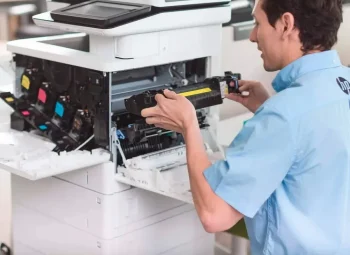
9. Maintain Your Printer Regularly
Printer maintenance is often overlooked when businesses calculate printing costs.
A poorly maintained printer may experience:
- Paper jams
- Print quality problems
- Slow performance
- Increased downtime
- Repeated service requirements
- Premature component failure
Regular maintenance can help identify potential problems before they become major operational issues.
Businesses using high-volume printers or multifunction devices should pay particular attention to servicing schedules and equipment condition.
“Preventive maintenance can help businesses avoid unnecessary downtime and reduce the disruption caused by unexpected printer problems.”
Printer Maintenance & Service Team
Reliable Technical Support for Office Printers
10. Consider Printer Rental or Managed Printing Solutions
For some businesses, the biggest opportunity to control printing costs may come from changing the way printing equipment is acquired and managed.
Instead of purchasing expensive equipment outright, businesses can consider printer rental in Kolkata.
Printer rental can be useful for businesses that:
- Want to reduce upfront investment
- Have changing printing requirements
- Need professional printing equipment
- Require technical support
- Want predictable monthly expenses
- Need equipment for a temporary project
Depending on the agreement, maintenance and technical support may also be included.
For growing businesses, rental can provide greater flexibility when printing requirements change.
Printer Rental & Managed Printing Team
Flexible Printing Solutions for Kolkata Businesses
How Print Management Can Reduce Office Expenses
For offices with significant printing activity, simply changing printer settings may not be enough.
A structured print management approach can help businesses understand:
- Who is printing
- What is being printed
- How frequently employees print
- How much colour printing is taking place
- Which devices are being used most
- Where unnecessary printing is occurring
This information can help businesses make better decisions about equipment placement, printer usage, and consumable management.
Print management can be particularly useful for organizations with multiple departments or several office locations.
Centralize Printing Where Practical
Providing every employee with an individual printer can increase equipment and consumable costs.
In some offices, centralized printing through shared multifunction devices may be more efficient.
A centralized approach can help businesses:
- Reduce the number of devices
- Simplify maintenance
- Consolidate consumables
- Improve equipment utilization
- Make printing easier to monitor
However, the right setup depends on the office layout, employee workflow, security requirements, and printing volume.
Don’t Choose a Printer Based Only on Purchase Price
A low-cost printer may appear attractive initially, but the purchase price does not represent the complete cost.
Businesses should also consider:
Cost per page + consumables + maintenance + downtime + equipment lifespan
A printer that costs slightly more initially may potentially be more economical over its working life if it provides better efficiency and lower operating costs.
This is why businesses should evaluate the total cost of ownership (TCO) before purchasing or renting office printing equipment.
Common Printing Mistakes That Increase Costs
Businesses can often reduce printing expenses simply by avoiding common mistakes.
These include:
- Printing unnecessary documents
- Using colour printing for routine documents
- Ignoring duplex printing
- Choosing unsuitable equipment
- Delaying printer maintenance
- Using incompatible consumables
- Printing large documents without checking formatting
- Providing too many individual printers
- Ignoring monthly print volume
- Not monitoring printing activity
Identifying these issues can be the first step toward a more efficient printing environment.
Creating a Cost-Efficient Printing Policy
A simple internal printing policy can help employees become more aware of printing costs.
Businesses can establish guidelines such as:
- Use duplex printing where appropriate
- Use black-and-white printing for routine documents
- Review documents before printing
- Avoid unnecessary document copies
- Use digital sharing whenever practical
- Print only the required pages
- Use centralized printers where suitable
- Report recurring printer problems
- Follow recommended maintenance schedules
The purpose of a printing policy should be to improve efficiency rather than unnecessarily restrict employees.
How to Build a More Efficient Office Printing Setup
Reducing printing costs requires more than buying a cheaper printer.
Businesses should look at the complete printing process.
Step 1: Calculate current printing volume
Understand how many pages the office prints every month.
Step 2: Identify unnecessary printing
Look for documents that could be shared digitally.
Step 3: Review printer usage
Determine whether existing equipment matches actual requirements.
Step 4: Compare operating costs
Review toner, paper, maintenance, and other recurring expenses.
Step 5: Improve printing settings
Enable duplex and appropriate default settings where practical.
Step 6: Centralize equipment where appropriate
Consider shared multifunction printers instead of multiple individual devices.
Step 7: Evaluate rental options
For businesses that do not want large upfront equipment investments, compare printer rental and purchase costs.
Step 8: Maintain equipment regularly
Preventive maintenance can help reduce avoidable downtime and repair costs.
Professional Printing Solutions for Kolkata Businesses
Every business has different printing requirements.
A small office may need a compact A4 multifunction printer, while a larger organization may require high-volume A3 equipment, centralized printing, or multiple multifunction devices.
At Computo Copier, businesses can explore professional printer, copier, multifunction printer, and printer rental solutions designed around their operational requirements.
The objective is to help businesses choose suitable equipment while managing printing efficiency, maintenance, and day-to-day document requirements.
Final Thoughts
Reducing office printing costs does not mean stopping employees from printing important documents.
It means creating a smarter printing environment.
By choosing the right equipment, monitoring printing activity, reducing unnecessary colour printing, using duplex printing, managing consumables, maintaining printers regularly, and considering flexible solutions such as printer rental, businesses can work toward better control over their printing expenses.
The most effective approach is to look at the entire printing lifecycle rather than focusing on the price of the printer alone.
A well-planned printing setup can help businesses improve productivity, reduce unnecessary expenses, and keep everyday office operations running smoothly.
Get in Touch
Looking for ways to reduce printing costs in your Kolkata office?
Contact Computo Copier to discuss your printing volume, equipment requirements, printer rental needs, and office printing solutions.